 Adam Smith
When your product lives across multiple platforms, maintaining visual consistency becomes a high-stakes challenge. A button that looks crisp on iOS might appear sluggish on web. Navigation that flows seamlessly in a native app could feel disjointed in a browser. This is where strategic mockup testing enters the picture.
Why Cross-Platform UI Testing Matters
Modern users don’t stay confined to single devices. They’ll start a task on their iPhone during their commute, continue on a MacBook at the office, and finish on an iPad at home. Each transition is an opportunity to either strengthen trust or expose inconsistencies that erode confidence in your brand.
Visual regression testing catches these discrepancies before users do. By presenting your interfaces in realistic device contexts, you spot problems that screenshots alone would miss—like how a desktop interface actually appears on a physical screen with real-world reflections and viewing angles.
The Power of Realistic Device Presentations
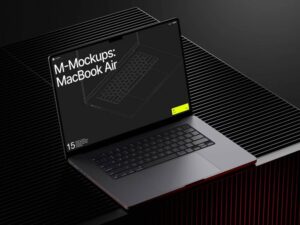
A Macbook mockup transforms flat screenshots into tangible experiences. Rather than squinting at isolated interface elements, stakeholders see exactly how your application breathes in its natural environment. This context reveals issues that remain invisible in abstract wireframes:
- Color accuracy shifts between glossy laptop displays and matte monitors
- Typography legibility varies dramatically with screen size and resolution
- Spacing that works perfectly on mobile feels cramped when scaled to desktop dimensions
- Shadow depth and button relief that pops on small screens might disappear on larger displays
Real-World Testing Scenarios
Consider a fintech startup preparing to launch their investment dashboard. The team developed separate web and iOS applications, each optimized for its platform. Before release, they generated mockups showing both versions side-by-side on matching MacBook displays.
The comparison immediately exposed three critical inconsistencies: the iOS app used their brand’s primary blue at 100% opacity, while the web version had inexplicably shifted to 85%. Chart legends aligned left on mobile but centered on desktop. Most importantly, the font weight for account balances differed by one step—subtle enough to miss in isolation but jarring when compared directly.
Another example: an education platform testing their video lecture interface discovered that control buttons clearly visible on the native Mac app became nearly invisible in the web version when displayed against certain background images. The mockup presentation made this obvious because both versions appeared in identical lighting conditions and viewing angles.
Premium Mockup Resources Transform Testing Workflows
Quality matters enormously when selecting mockup tools. Low-resolution renders or unrealistic lighting can actually obscure problems rather than reveal them. The mockup resources available at ls.graphics demonstrate what professional-grade assets bring to the testing process.
Their ultra-realistic rendering captures authentic screen glare, chassis reflections, and ambient lighting effects. Organized layers let you swap interfaces rapidly without rebuilding compositions. Multiple viewing angles—from straight-on presentations to subtle three-quarter views—help you evaluate how interfaces hold up from different perspectives.
The variety of color styles and minimalistic compositions means you can match mockups to your brand aesthetic while keeping focus on the interface itself. Most valuable for rapid testing cycles: these tools are genuinely easy to use. Designers can generate comparison mockups in minutes rather than hours.
Building a Consistent Testing Process
Effective consistency testing requires systematic comparison protocols:
- Create standardized scenarios that exercise identical user flows across platforms
- Generate mockups at matching scales and viewing angles for direct comparison
- Test color values, typography, spacing, and interactive element states simultaneously
- Document discrepancies with annotated mockup exports that clearly show the problem
- Iterate rapidly using the same mockup templates to verify fixes maintain consistency
Stakeholder Communication Benefits
Technical teams understand the importance of pixel-perfect consistency, but executives and clients often need visual proof. Mockups bridge this communication gap. When you present a MacBook displaying your web app alongside another showing the native version, non-technical stakeholders immediately grasp issues that verbose bug reports would obscure.
This visual clarity accelerates decision-making and reduces revision cycles. Instead of debating whether a reported inconsistency “really matters,” everyone sees the problem simultaneously and agrees on priority.
Conclusion
Cross-platform consistency isn’t just aesthetic perfectionism—it’s fundamental to user trust and professional credibility. MacBook mockups transform abstract interface comparisons into concrete visual evidence, revealing discrepancies that would otherwise slip through quality assurance. By incorporating realistic device presentations into your testing workflow, you catch problems early, communicate issues clearly, and deliver experiences that feel cohesive regardless of where users encounter your product. The investment in quality mockup resources pays dividends in faster iteration cycles and more confident product launches.